Feature Flag Segments: Rule-Based & List Segments Explained
Segments are reusable audience definitions you attach to feature flags. Define "Enterprise customers" once and reference it from every flag, so a single update propagates everywhere instantly.
What are segments?
A segment is a named, reusable audience. Instead of duplicating targeting rules across every flag, you define the audience once and reference it by name.
Without segments, every flag that targets enterprise users must repeat the same conditions: plan = enterprise AND mrr > 500. Change the definition and you have to touch every flag.
With segments, you define "Enterprise customers" once. Reference it from 14 different flags. Update the definition and all 14 flags update instantly, with a single change and a single audit log entry.
There are two segment types. Rule-based segments evaluate conditions against user context at runtime; membership is automatic. List segments contain an explicit set of user or account IDs; membership is curated manually.
Conditional rule-based segments
Membership is computed automatically at flag evaluation time. If a user matches the conditions, they are in the segment with no manual updates needed.
Rule-based segments evaluate a set of conditions against the user context object passed to the SDK at flag evaluation time. If all conditions pass (AND logic) or any condition passes (OR logic), the user is a member.
Conditions support a range of operators across string, number, and boolean attribute types. You can chain conditions with AND / OR and nest groups for complex audiences.
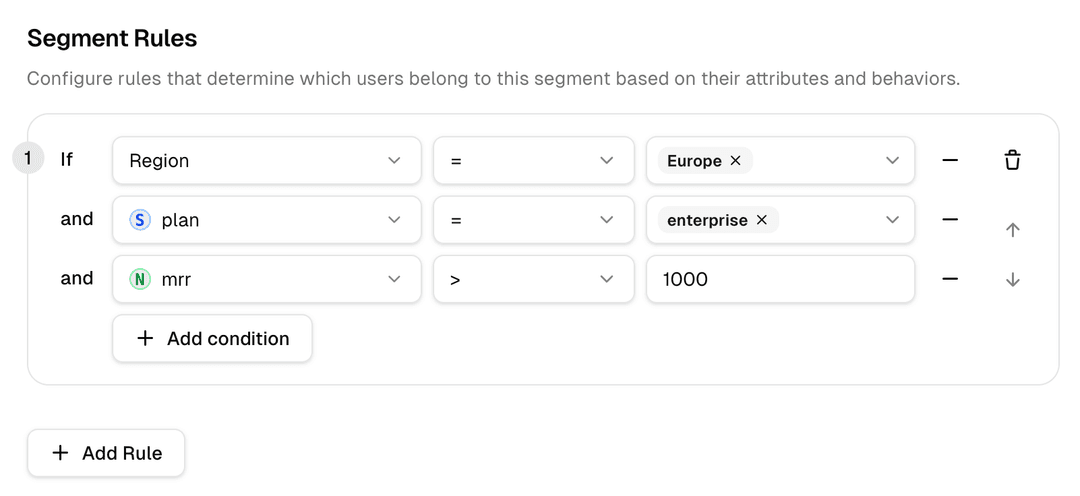
Segment Rules
Configure rules that determine which users belong to this segment based on their attributes.
AND logic
All conditions must be true. Narrows the audience. Use to tightly target a specific cohort.
OR logic
Any condition must be true. Broadens the audience. Use to union multiple criteria into one segment.
Nested groups
Combine AND and OR with parentheses to build complex logic:(plan = "enterprise" AND mrr > 500)
OR
(betaOptIn = true AND signupDaysAgo < 30)
List segments
An explicit allowlist of user or account IDs. Membership is managed manually, useful when the audience cannot be described by a rule.
Some audiences resist rule-based definition. Your five largest enterprise accounts might all be on different plans, different MRR brackets, and different regions. No single condition captures them, but you know exactly who they are.
List segments store a set of identifiers — typically user IDs or account IDs that are checked at evaluation time. If the user's ID appears in the list, they are in the segment.
List Items
Add values to create a static list for this segment. Enter comma-separated values.
Add Items ( userIds )
Separate multiple values with commas
Items in List (4)
user_5501API · deploy-script14d agoCombining rule-based and list segments
A single flag can reference both segment types in the same targeting rule. Mix and match to build precise audiences without duplication.
Who gets the feature
Segment lifecycle
Segments are living objects. They evolve as your product and user base grows. Here is how to keep them healthy.
Start with the simplest possible definition. Premature complexity in a segment is hard to unwind. A broad segment can be narrowed; an overly narrow one causes you to duplicate it.
Reference the segment from flags. Every flag that already has an equivalent inline rule is a candidate for migration; consolidating to a segment reduces maintenance surface.
As you learn more about the audience, update the segment definition. All flags referencing it pick up the change instantly, with a single change event in the audit log.
When a segment is no longer relevant (e.g. a beta programme ends), archive it. Archiving detaches it from all flags and preserves the history without cluttering the active list.
Get started
Build your first segment in minutes
Supaship supports both rule-based and list segments, reusable across unlimited flags. Free to start.