Feature Flags: The Complete Guide for Modern Software Teams
Learn everything modern software teams need to know about feature flags, feature management, and progressive delivery: what they are, the key types that matter, how to design them for production, and the rollout strategies that make releases safer.
See how Supaship delivers a developer-first feature flagging experience with feature flags and AI configs, instant targeting rules, percentage rollouts, and a lightning-fast flag evaluation at the edge - all without requiring a deploy.
What are feature flags?
A feature flag (also called a feature toggle or feature switch) is a software development technique that lets you enable or disable features at runtime, without deploying new code.
At its simplest, a feature flag is an if statement whose condition is controlled remotely rather than hardcoded. Instead of:
// Old way — requires a deploy to change
if (process.env.NEW_CHECKOUT === 'true') {
  renderNewCheckout()
}
You evaluate the flag at runtime from a remote source:
// Feature flag — flip without a deploy
const enabled = await flags.isEnabled(
  'new-checkout-flow',
  { userId: user.id, plan: user.plan }
)

if (enabled) renderNewCheckout()
This decouples deployment from release, giving your team control over when and to whom a feature is visible without requiring a deployment.
Key concepts
flags.isEnabled("checkout-v2", { userId, plan })Local evaluation
SDK fetches the full ruleset from the edge on init and caches it in-memory. All subsequent evaluations run locally with no network call.
Edge evaluation
SDK sends the context to the edge, rules are evaluated there, and only the result is returned. Simpler setup, no local cache needed.
Rule:    IF plan == "pro"  →  true
Context: { userId: "usr_42", plan: "pro" }
↑ matchif (enabled) renderNewCheckout()Types of feature flags
Not all flags are the same. Understanding the six core types helps you use the right tool for the job, and avoid letting flags live too long.
Release flags
Enable trunk-based development by merging unfinished code behind a flag. Ship to production confidently and flip the switch when ready.
new-checkout-flowExperiment flags
Run A/B tests and multivariate experiments by routing users to different variants and measuring outcomes before committing.
homepage-hero-variantOps / kill-switch flags
Instantly disable a feature during an incident without a code deploy. The safety net every on-call engineer needs.
legacy-payment-fallbackPermission flags
Control feature access by user role, plan tier, or organisation. Power your product's entitlement model at runtime.
ai-suggestions-proGradual rollout flags
Release to a percentage of traffic and increase incrementally, monitoring errors and metrics at each stage.
new-editor-v2Beta / early access flags
Invite specific users or cohorts to try a feature before the general release. Collect feedback with minimal risk.
onboarding-v3-betaLifetime guidance
Release and experiment flags should be short-lived (days to weeks). Ops and permission flags are long-lived and intentional. Treat flags like branches: merge and delete them or they become debt.
Feature flag architecture
A production-grade feature flag system has four layers: a control plane, a delivery layer, an SDK, and an analytics pipeline.
checkout-v2enabledsupaship.comflags.isEnabled("checkout-v2", ctx) → true | falseControl plane
The UI and API where teams create flags, define targeting rules, and manage environments. Changes propagate in real time.
Delivery layer
Flags are pushed to a CDN or streamed via SSE/WebSocket to SDKs. Edge evaluation ensures sub-millisecond latency.
Client SDK
A lightweight library in your app that evaluates flags locally using a cached ruleset, with no network round-trip per evaluation.
Analytics pipeline
Evaluation events, impression counts, and latency metrics feed into dashboards to monitor rollout health.
Local vs remote evaluation
Local evaluation: the SDK holds a cached copy of all flag rules and evaluates them in-process. Zero network latency. Requires background polling or a streaming connection to stay fresh.
Remote evaluation: the SDK sends the context to a server which returns the result. Simpler SDK, but adds a network hop per request. Unsuitable for high-frequency evaluations.
Bootstrapping & SSR
For server-rendered apps, evaluate flags server-side and bootstrap the SDK with the evaluated state. This eliminates flicker (the UI change after hydration) and avoids an extra round-trip on load.
// Next.js — eval server-side, bootstrap client
const flags = await getFlags({ userId })
return <ClientProvider bootstrap={flags} />Feature flag rollout strategies
A safe release is a staged release. These six strategies form a progressive confidence ladder; each step de-risks the next.
Step 01
Dark launch
Deploy code to production and execute logic silently, with no user-visible changes. Validate performance and correctness at scale before anyone sees it.
Step 02
Internal dogfood
Enable for employees first. Your team experiences the feature in production, surfacing UX issues and edge cases before external exposure.
Step 03
Beta / canary
Open to a small, opted-in cohort. Gather qualitative feedback from real users who expect rough edges and report them.
Step 04
Percentage rollout
Gradually expand from 1% → 5% → 25% → 100%. Monitor your error rate and key metrics at each threshold before proceeding.
Step 05
Geographic or segment rollout
Release to one region, plan tier, or user segment first. Ideal for compliance-sensitive features or market-specific changes.
Step 06
Full release
Flip to 100% and remove the flag from code within 1–2 sprints. Flags are technical debt; clean them up before they accumulate.
Feature flags vs environment variables
Environment variables are set at build or deploy time. Feature flags are evaluated at runtime. The difference is foundational.
When to use each
Use environment variables for infrastructure config: database URLs, API keys, service endpoints, and values that are fixed for a deployment. Use feature flags for product decisions: what users see, gradual rollouts, and anything you might need to change without redeploying.
Feature flags in Supaship
Supaship supports two primitives: boolean feature flags for on/off decisions, and AI configs (JSON payloads for prompts, model settings, UI copy, thresholds, and per-user tuning). Both share the same targeting and rollout engine. Here's what that looks like in practice.
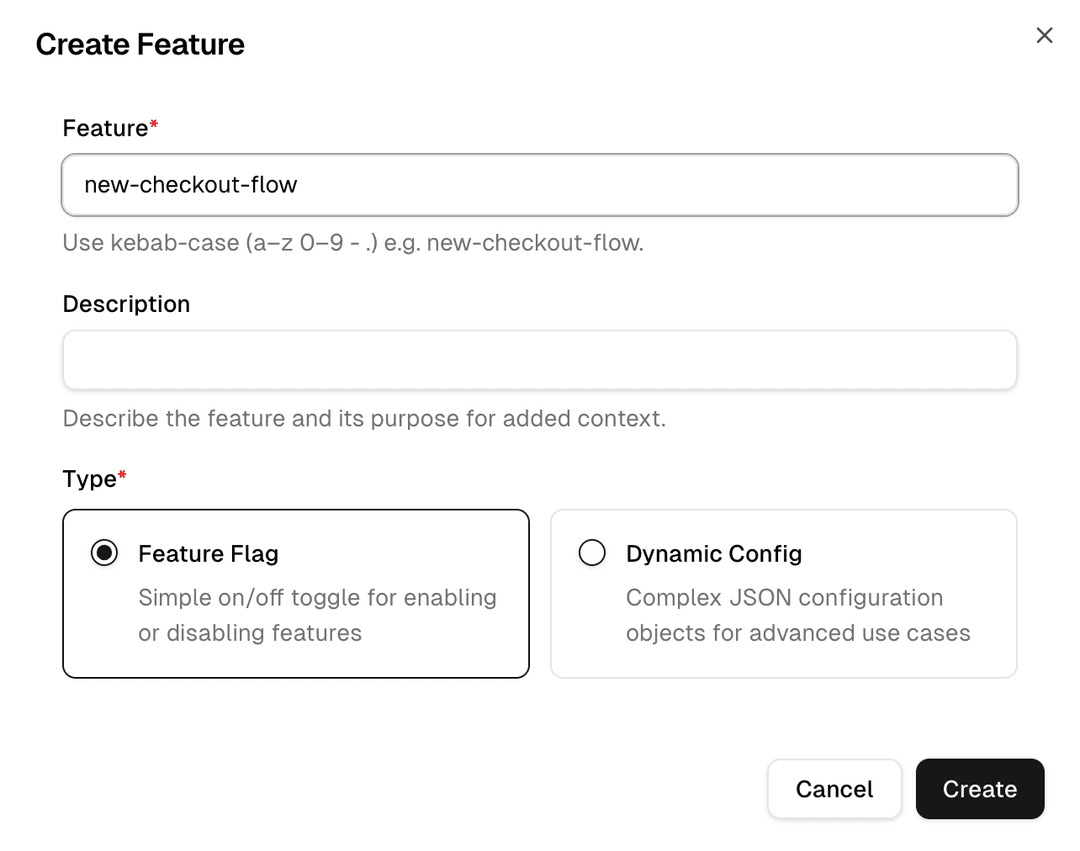
Create a flag in seconds
Supaship has boolean feature flags and AI configs.
Boolean flags return true or false , ideal for feature gating and kill-switches.
AI configs are JSON payloads for advanced use cases: model and prompt parameters, structured UI copy, feature thresholds, per-segment settings, and anything that would otherwise be a hardcoded constant.
Both use the same targeting and rollout engine.
- Boolean flags: on/off gating, kill-switches, and access control
- AI configs: JSON payloads tuned from the dashboard, no deploy needed
- Per-environment state: production and staging are isolated
- Flag description for team clarity
Target the right users
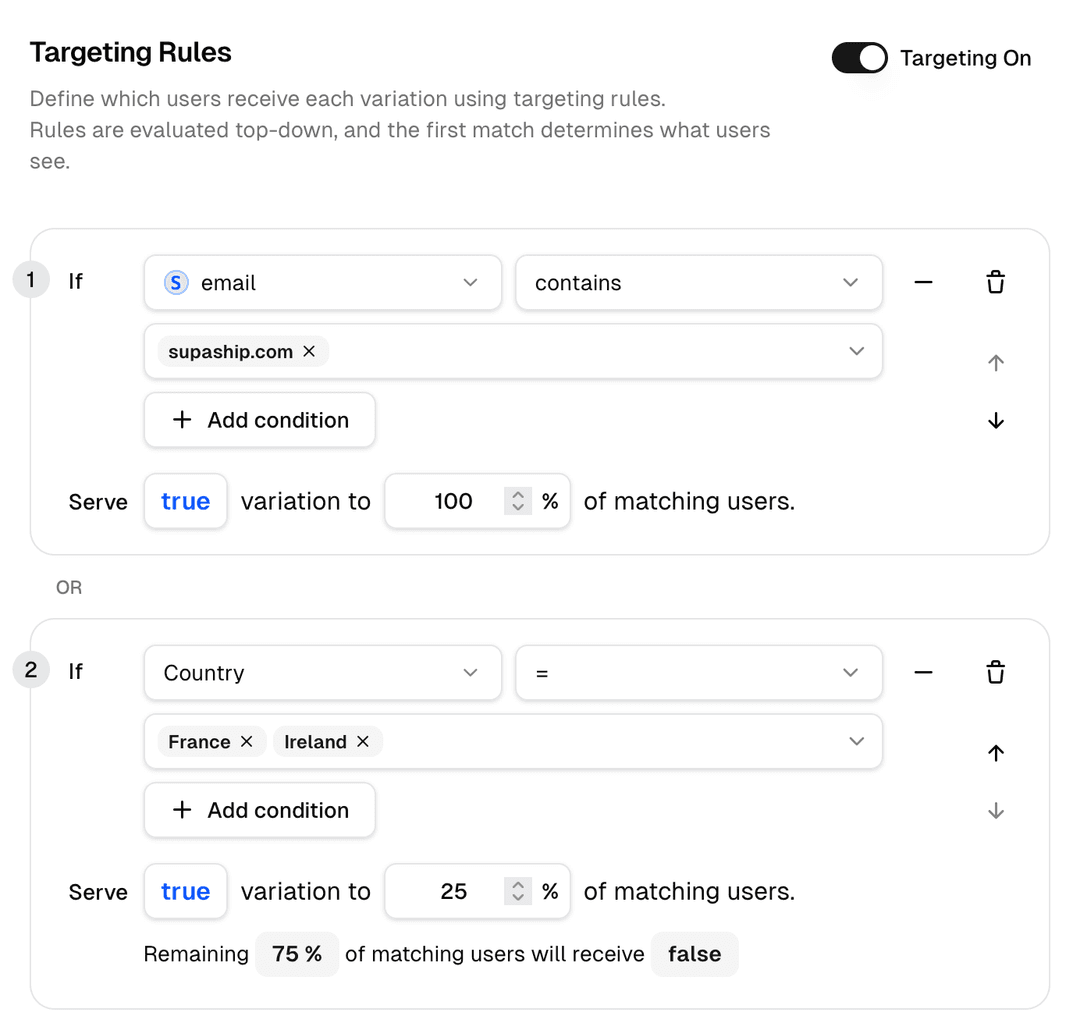
Define targeting rules using any attribute you pass in the evaluation context (userId, plan, company, or custom properties). Rules are evaluated top-down and return the first match.
// Pass any context attributes at evaluation time
const enabled = await client.getFeature("ai-suggestions", {
  context: {
    userId: "usr_123",
    plan: "pro",
    company: "acme-corp",
  },
})Roll out progressively
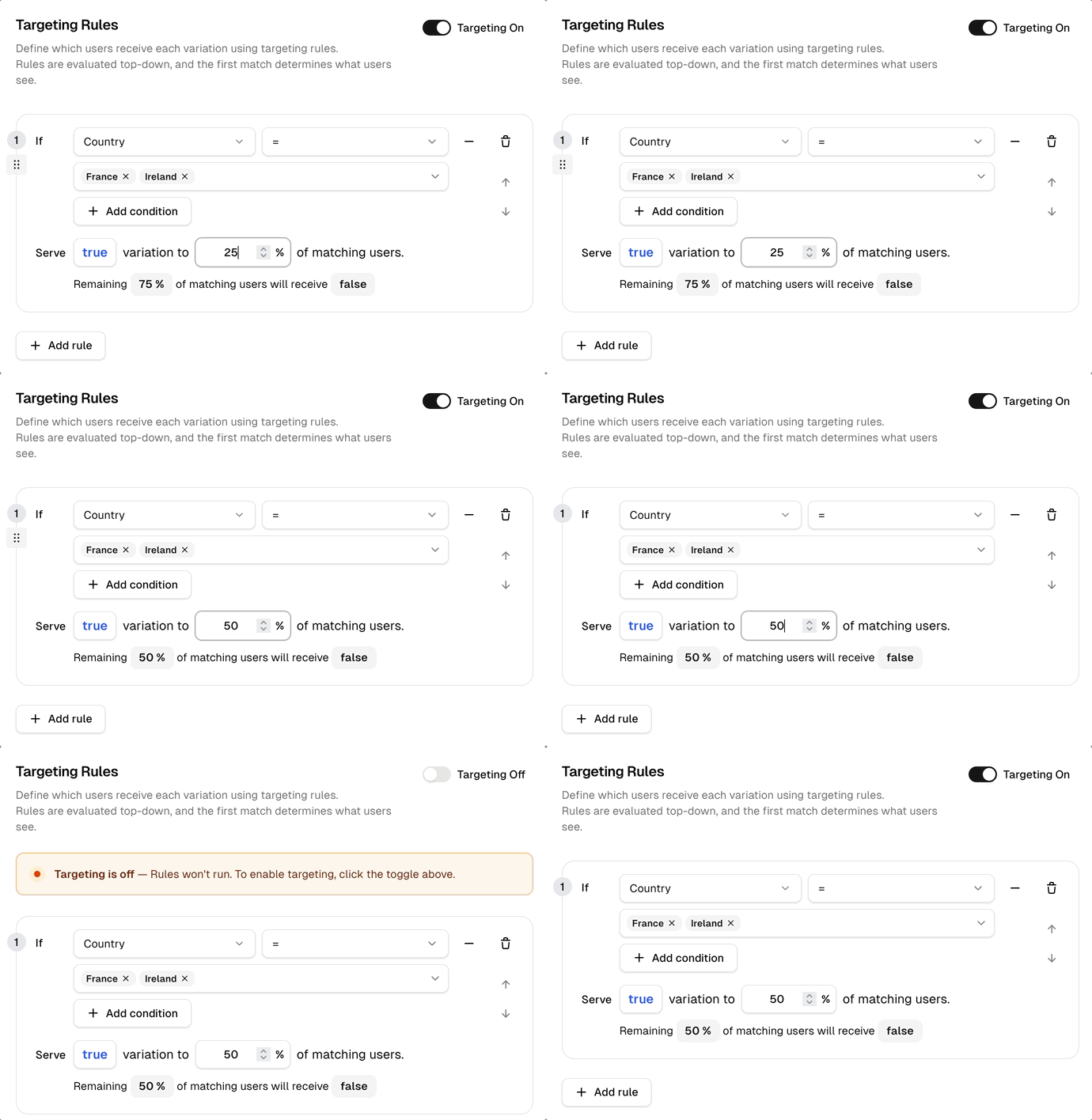
After your targeted rules, set a percentage rollout for the remaining audience. Assignments are sticky: the same user always gets the same result, so you don't create inconsistent experiences as you ramp.
- Sticky user bucketing based on userId hash
- Adjust the percentage values without a deploy
- Combine targeted rules with percentage fallback
- Instant kill-switch: turn off the targeting to disable the feature for all
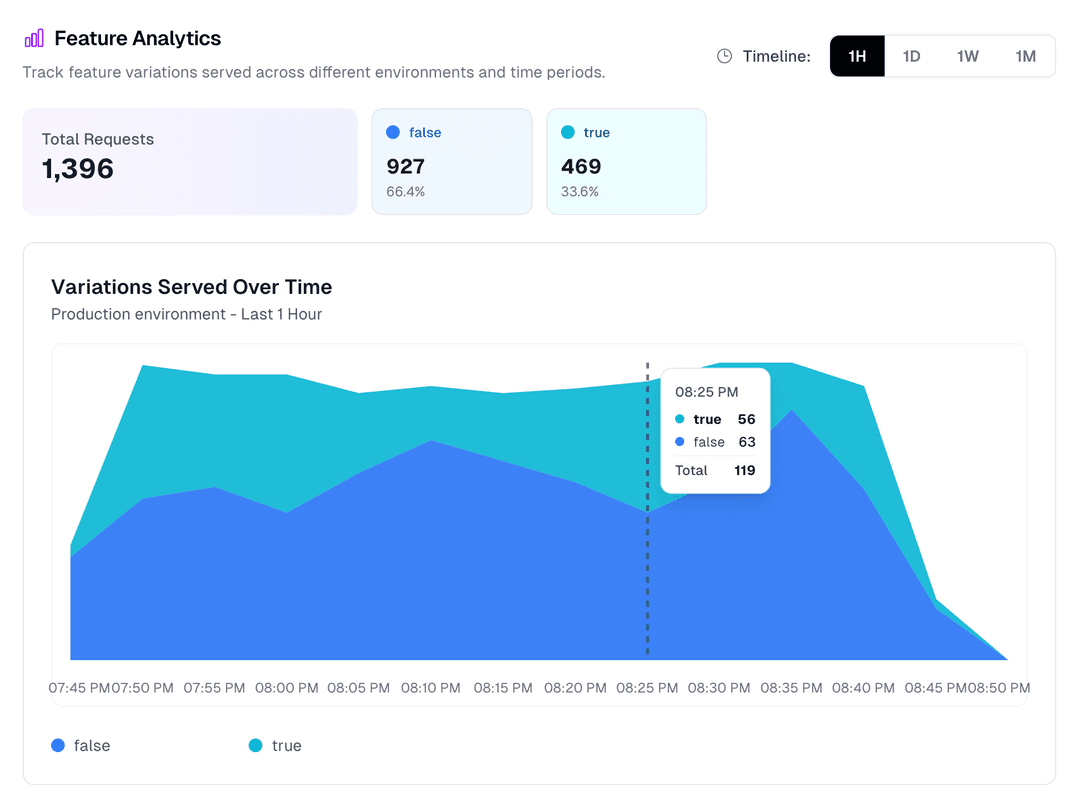
Monitor every evaluation
Every flag evaluation is tracked. See impression counts, variant distributions in real time. Use this to confirm your rollout percentages are behaving correctly before expanding.
@supashiphq/javascript-sdkInstall
npm install @supashiphq/javascript-sdkBoolean flag
import { SupashipClient, FeaturesWithFallbacks }
  from '@supashiphq/javascript-sdk'

const features = {
  'new-onboarding': false,
} satisfies FeaturesWithFallbacks

const client = new SupashipClient({
  sdkKey: process.env.SUPASHIP_SDK_KEY!,
  environment: 'production',
  features,
  context: { userId: user.id, plan: user.plan },
})

// Fully typed — returns boolean
const show = await client.getFeature('new-onboarding')

if (show) renderNewOnboarding()
AI config
import { SupashipClient, FeaturesWithFallbacks }
  from '@supashiphq/javascript-sdk'

const features = {
  'checkout-copy': {
    headline: 'Get started',
    cta: 'Sign up free',
  },
} satisfies FeaturesWithFallbacks

const client = new SupashipClient({
  sdkKey: process.env.SUPASHIP_SDK_KEY!,
  environment: 'production',
  features,
  context: { userId: user.id, plan: user.plan },
})

// Fully typed — returns { headline: string; cta: string }
const config = await client.getFeature('checkout-copy')

renderCheckout(config)
Batch fetch · multiple flags in one call
const results = await client.getFeatures(['new-onboarding', 'checkout-copy'], {
  context: { userId: user.id, plan: user.plan },
})
// { 'new-onboarding': true, 'checkout-copy': { headline: '...', cta: '...' } }Best feature flag tools in 2026
There's no single right answer. The best tool depends on your team size, budget, and technical requirements.
Supaship
RecommendedDeveloper-first · free to start · sub-50ms evaluations
LaunchDarkly
Enterprise-grade · extensive integrations
ConfigCat
Simple · SDKs for many languages
Unleash
Open-source · self-hostable
Get started
Ready to ship with confidence?
Supaship gives you feature flags, targeting, and rollout controls, free to start, up in 5 minutes.