Feature Flag Rollout Strategies: Ship Safer, Faster
Every release is a risk. These six strategies let you control that risk — exposing features progressively while keeping instant rollback at your fingertips.
What is a rollout strategy?
A rollout strategy is a plan for progressively exposing a code change to users — from zero to 100% — while maintaining the ability to roll back instantly.
Traditional deployments are binary: code is either deployed or not. Feature flags decouple deployment (pushing code to production) from release (exposing it to users). This separation is the foundation of every modern rollout strategy.
The goal is to build progressive confidence — each stage of a rollout validates a hypothesis before the next stage expands exposure. If any stage fails a gate check, you halt or roll back without a deployment.
Code is merged, built, and pushed to production servers. The new code exists in the running system but may be unreachable.
Users can actually see and interact with the feature. Controlled by a flag — flipped remotely, no redeploy needed.
The 6 core rollout patterns
These patterns form a confidence ladder — each step reduces risk by validating at a broader scale before the next.
Dark launch
Deploy the code and run it in production without showing any UI change. Validate performance, database queries, and downstream integrations at real scale.
Internal dogfood
Enable the feature only for your own employees. You get real production feedback from people who understand the product and can report edge cases clearly.
Beta / canary
Invite a group of external users who actively want to try new features. They expect rough edges and give qualitative feedback in exchange for early access.
Percentage rollout
Gradually increase traffic exposure: 1% → 5% → 25% → 100%. Monitor error rates, latency, and business metrics at each threshold before proceeding.
Geographic / segment
Release to one region, plan tier, or user segment first. Ideal when regulatory compliance, localization, or market-specific behaviour is a concern.
Full release
Flip to 100% and schedule flag removal within the same sprint. Flags that linger become technical debt. Build the cleanup into your definition of done.
Choosing the right strategy
There's no one-size-fits-all. Use this matrix to pick the right starting point based on your change type, team, and risk tolerance.
Rollout gates & monitoring
A rollout gate is a condition that must pass before expanding to the next stage. Automated gates remove human guesswork.
Error rate gate
Compare error rate in the enabled cohort vs control. If it increases by more than X%, halt the rollout automatically.
error_rate < baseline × 1.05Latency gate
Monitor p99 latency for the new code path. A meaningful increase signals a performance regression before it affects everyone.
p99_latency < 200msBusiness metric gate
Track conversion, engagement, or revenue per user. Statistically confirm the metric is stable before the next increment.
conversion_rate ≥ control − 0.5%Volume gate
Ensure you have enough events to make a statistically valid decision before expanding to a larger audience.
sample_size ≥ 500 usersCommon rollout mistakes
Even experienced teams make these errors. Knowing them upfront saves production incidents.
Jumping straight to user-visible stages without validating the underlying infrastructure leads to cascading failures at scale.
Expanding a rollout the same hour it was enabled is gambling. Give each stage time to accumulate meaningful signal.
Flags that outlive their release become land mines. Over time, combinatorial complexity makes them nearly impossible to reason about.
Initiating a rollback deployment during an incident adds minutes to MTTR. A flag flip is immediate and requires no CI pipeline.
Going from 0% to 100% is not a rollout — it's a deployment. Even a 5-minute internal stage provides a meaningful safety net.
Mixing environments means you can't safely test a flag state without risk to production. Environments must be independent.
Rollout in Supaship
Define who qualifies and what percentage they receive — all from the dashboard, no redeploys, no code changes.
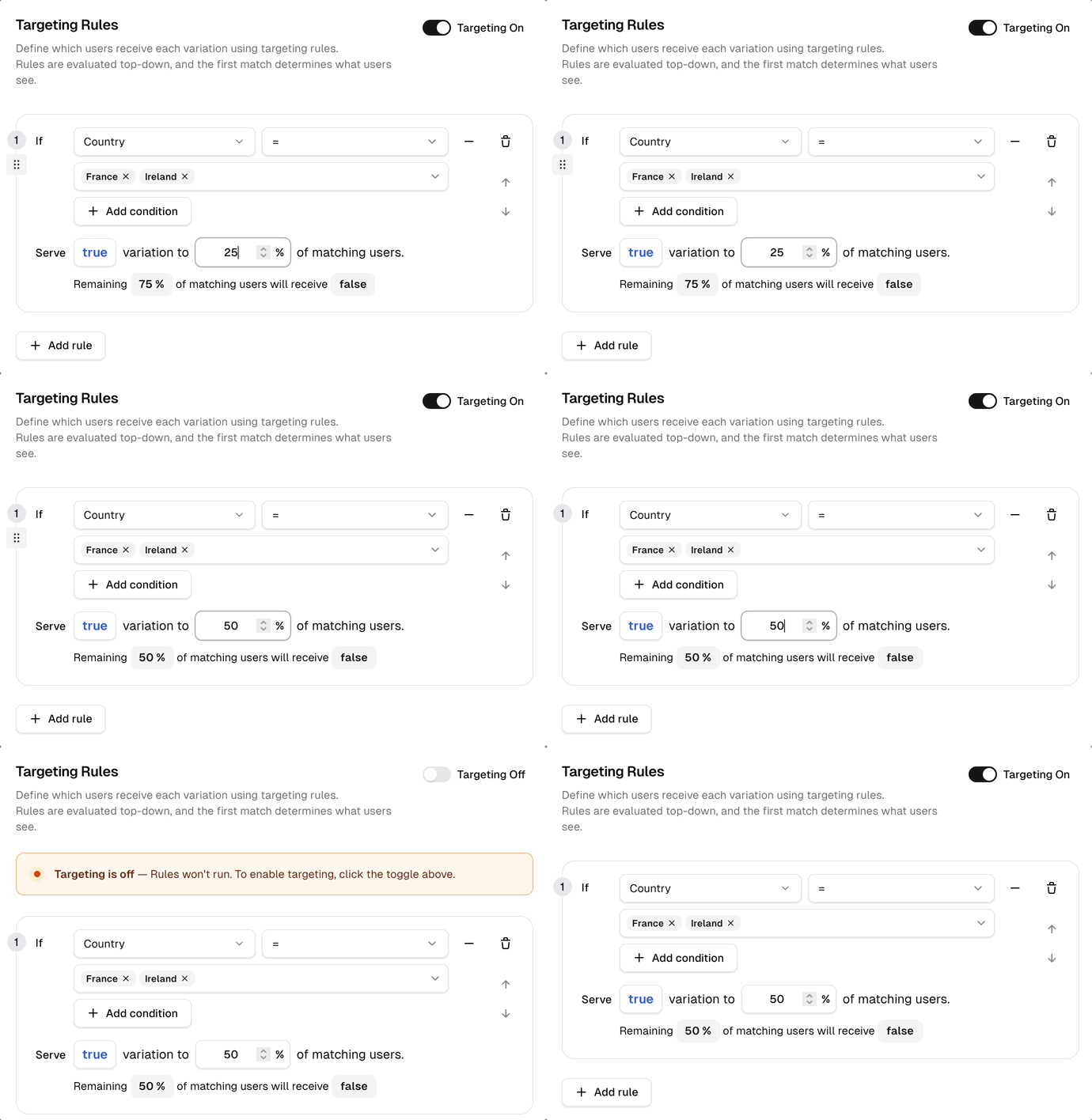
What you see above
How to set up a rollout
Create the flag
Give it a key and set the default variation (false). The flag is off for everyone until you add rules.
Add a targeting rule
Define who qualifies using any attribute (plan, country, email, custom). Set the percentage of matching users to receive true.
Toggle targeting on
Hit the Targeting On switch. Rules publish to the edge network instantly — no CI, no deployment pipeline.
Monitor & expand
Watch evaluation counts and per-rule impressions. When confident, increase the percentage or add more regions.
Kill-switch if needed
Toggle targeting off to instantly revert everyone to the default variation — faster than any rollback deploy.
Rollout metrics
Get started
Run your first rollout in under 5 minutes
Supaship gives you percentage rollouts, targeting, and instant kill-switches. Free to start.